Credit Karma’s credit scores, reports and monitoring are free, so there is no paid membership to cancel: “cancelling” means deactivating your Credit Karma account. Credit Karma’s Terms of Service (effective May 4, 2026) say you can deactivate your account through its help page, and the terms stay in force until the account is deactivated by you or by Credit Karma.
You can start on the website or in the app. Deactivating the account is not the same as asking Intuit, Credit Karma’s parent company, to delete your personal data; that is a separate privacy request, covered in the FAQs below.
Key Takeaway
- Your data: Intuit’s Privacy Statement (updated March 9, 2026) says it may keep personal information after a deletion request or after the relationship ends, as long as needed for legal or regulatory needs, legal claims or fraud prevention.
- Credit score: Credit Karma says checking your scores through it is a soft inquiry with no impact on your scores. Closing the free account does not close any credit card or loan you hold elsewhere.
- Save what you need first: Credit Karma says history stored in an old account, such as credit report history, is not available in a new account.
- Credit Karma Savings: Credit Karma tells Savings account holders not to replace their existing Credit Karma account, so check your Savings account in the help center before you deactivate.
- Help: Credit Karma’s US help center is at support.creditkarma.com.
How to Cancel Credit Karma Membership Online?
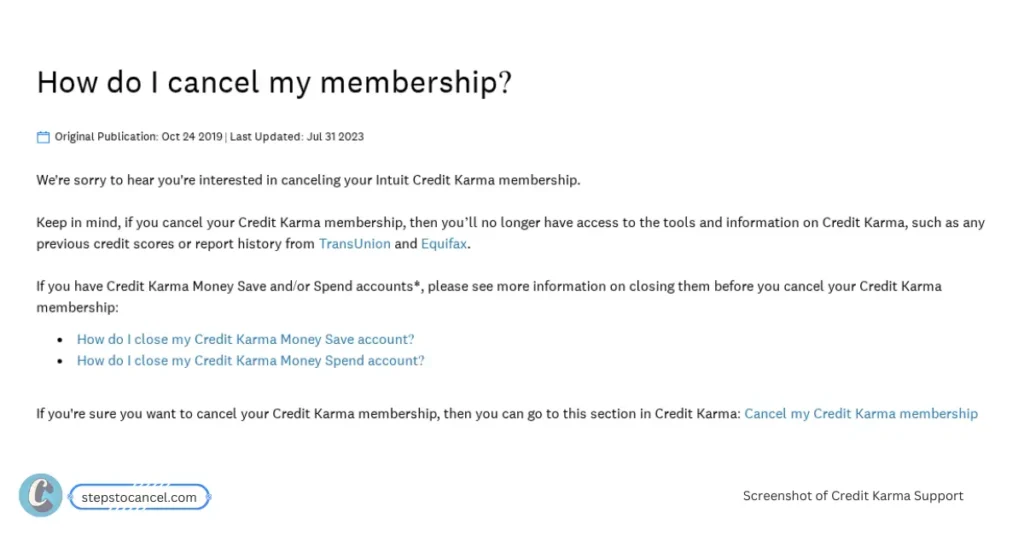
If you have a Credit Karma Savings account or another Credit Karma Money product, check it in the help center first. Then follow the steps below. Credit Karma can change its menu labels, so if a label differs, use the official help article linked under the steps.
Step 1: Log In to your Credit Karma account
Go to creditkarma.com and sign in to your account.
Step 2: Open your account settings
Open your profile menu and choose your profile or account settings.
Step 3: Choose the option to close your account
Look for the account-closure option in your settings and confirm when Credit Karma asks.
If you can’t find the option, use the official help article linked below.
Step 4: Confirm account closure
Keep a screenshot of the final confirmation, with the date, in case you need to show that you closed the account.
Alternative Method
If you do not find the “Close my Account” option then, visit “how do I cancel my membership?” support guide and follow the current instructions there.
How to Delete Credit Karma Account from Mobile App?
In the Credit Karma app, account settings sit behind your profile. Labels vary by app version, so these steps stay general.
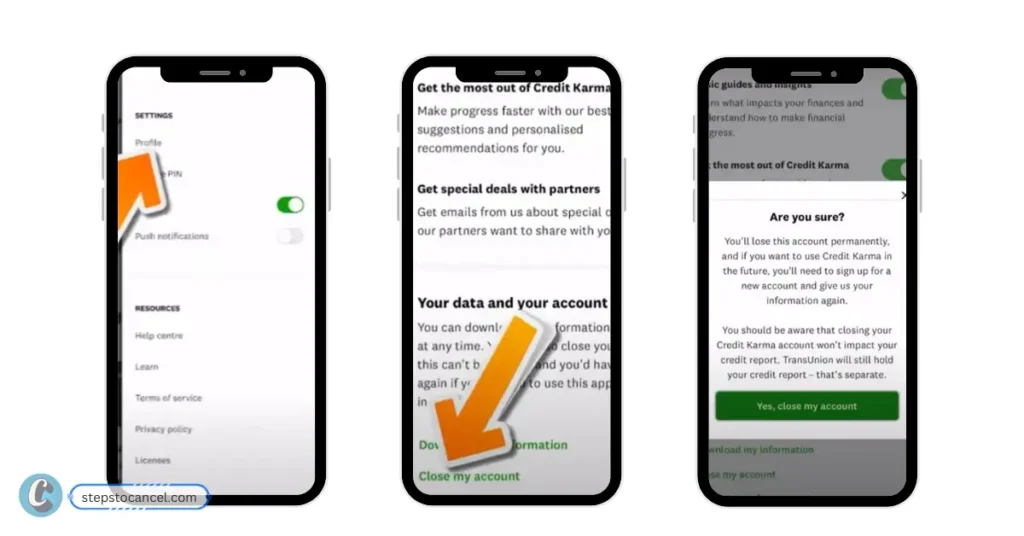
- Open the App: Launch the Credit Karma app on your iOS or Android device and log in.
- Go to Settings: Tap “Profile” or “Settings” (label may vary by device or app version).
- Find the close-account option: Look for the option to close or deactivate your account. If you can’t find it, search the help center for “close account.”
- Confirm: Follow the on-screen prompts to confirm.
- Keep a record: Screenshot the final confirmation screen.
Tip: If the option doesn’t appear in the app, use the website steps above or the official help article.