Cancelling your Tidal Wave Auto Spa Clean Club membership is straightforward once you know the right path. You can do it online, over the phone, or in person — there’s no contract, no cancellation fee, and no minimum commitment. The one thing to keep in mind is the 7-day timing rule, which we’ll cover before anything else.
What to Know Before You Cancel
Before you submit your cancellation, there are a few things worth knowing so you don’t get caught off guard by a charge or a form error.
The 7-day rule. Tidal Wave requires all cancellation requests to be submitted at least 7 business days before your monthly recharge date. Your recharge date is the anniversary of the day you first enrolled. Miss that window and your card will be charged for another billing cycle — there are no exceptions to this.
No refunds. Once a charge goes through, Tidal Wave will not reverse it. Your membership stays active and fully usable until the end of the billing period you’ve already paid for, but you won’t get that money back.
Your Club sticker number. This is the 11-digit number printed on the RFID tag on your windshield (format: 12345+123456). The online form will ask for it. It’s helpful to have, but not required — you can still submit without it.
Family Clean Club plans cannot be cancelled online. If you have a Family plan, the online form will return an error. You’ll need to cancel by phone or in person instead. See the Family Plan section below.
What to have ready:
- Your Club sticker number (if you can find it)
- The Tidal Wave location where you originally enrolled
- The email address on your account
How to Cancel Your Tidal Wave Car Wash Membership
Three ways to cancel your Tidal Wave Clean Club plan: online form, phone, or in person. Choose the method that works for your situation — the online form is fastest for standard individual plans.
Method 1: Cancel Online
Go to the Manage Your Club page
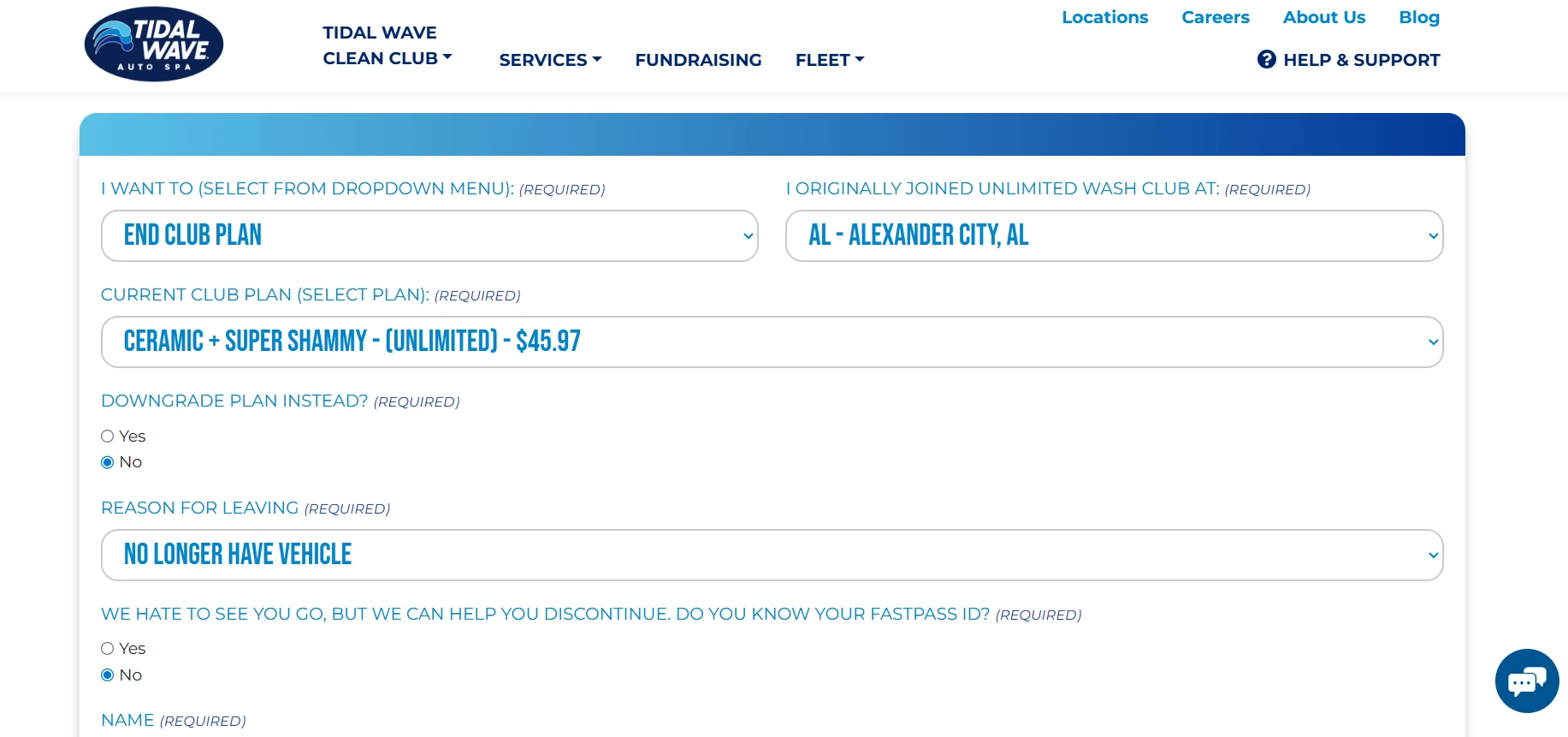
Navigate to tidalwaveautospa.com/manage-your-club. This is the official membership management portal — it handles cancellations, plan changes, and card updates in one place.Open the “I want to” dropdown and select “End Club Plan”
Click the dropdown at the top of the form and choose End Club Plan. Don’t select “Change Club Plan” or “Update My Card” by mistake — only “End Club Plan” will initiate a cancellation. [Screenshot suggestion: dropdown showing “End Club Plan” selected]Select the location where you originally joined
Use the location picker to choose the specific Tidal Wave Auto Spa where you first signed up. If you’re unsure, pick the location closest to where you were living when you enrolled.Enter your 11-digit Club sticker number (if available)
Look for the RFID sticker on your windshield — the number is in the format12345+123456. If the sticker is missing or unreadable, leave this field blank and continue. The form will still go through.Complete your contact details and submit the form
Fill in your name and email address, then submit. Make sure the email address you enter matches the one on your account — your confirmation will be sent there.Check your email for a confirmation
Tidal Wave sends a confirmation email once your request is processed. If nothing arrives within 2–3 business days, don’t assume the cancellation went through — check your spam folder, then follow up by phone or revisit the form. Your membership stays active (and usable) until your next billing date.
Method 2: Cancel by Phone
Call Tidal Wave customer service
Dial (706) 938-0991. Phone cancellation is useful if you’re close to your recharge date and need to speak with someone directly, or if the online form is returning errors.Tell the representative you want to end your Clean Club plan
Be specific: say you want to cancel, not pause or change your plan. This avoids any misunderstanding about what action is being taken on your account.Provide your account details
Give your Club sticker number if you have it, plus the location where you enrolled. If you don’t have the sticker number, your name, email address, and enrollment location are usually enough to locate your account.Ask for a confirmation email before ending the call
Request that the representative send a written confirmation to your email address. Having a paper trail matters if there’s ever a dispute about when you cancelled.Check your email for confirmation
The same confirmation email sent for online cancellations applies here. If it doesn’t arrive within a day or two, call back or follow up via the online form to verify your cancellation is on record.
Note: Some users have reported difficulty getting through on the phone line. If calls go unanswered, the online form is a reliable alternative.
Method 3: Cancel In Person
Find your nearest Tidal Wave Auto Spa
Use the location finder at tidalwaveautospa.com/locations. You can visit any location — you don’t have to return to the one where you originally signed up.Ask a team member to end your Clean Club membership
Tell them you’d like to cancel (not pause or change) your plan. Staff can process the cancellation directly from the point-of-sale system without needing the online form.Provide your Club sticker number or the card used at sign-up
Either the 11-digit sticker number or the payment card on file is enough to pull up your account. If neither is available, your name and enrollment location will usually work.Ask for a confirmation email before you leave
Request that the team member enter your email address so the confirmation is sent while you’re still there. That way you can verify it arrives before driving off.
In-person cancellation is the best option if you’re within 7 days of your recharge date and need immediate assistance, or if you hold a Family Clean Club plan (which cannot be cancelled online or, in some cases, by phone — see below).
Cancelling a Family Clean Club Plan
Family Clean Club plans are handled differently. The online form doesn’t support them — submitting your details will return an error message, and your plan won’t be cancelled. You have two options:
- In person: Visit any Tidal Wave Auto Spa location and ask a team member to end the Family plan. This is the most reliable route.
- By phone: Call (706) 938-0991 and request cancellation directly.
Whichever option you choose, ask for a written email confirmation before you finish. The 7-day timing rule and no-refund policy apply exactly the same way as they do for individual plans.
Common Problems & Fixes
“I’m getting an error message when I try to cancel online”
There are three documented causes, each with a different fix:
Wrong Club number. Double-check the 11-digit number on your windshield sticker (format: 12345+123456). If it’s damaged or missing, leave the field blank — the number is helpful but not required.
Recharge already in progress. If your billing cycle is actively processing, the form locks out changes. Call (706) 938-0991 or visit a location to handle it manually.
You have a Family Clean Club plan. Family plans can’t be cancelled through the online form at all. Head to the section above for your options.
“I cancelled but I’m still being charged”
Start by checking when you submitted your cancellation relative to your recharge date. If it was fewer than 7 business days before billing, that final charge is covered under Tidal Wave’s stated policy — frustrating, but expected. If your cancellation was timely and you’re still being charged, here’s what to do:
- Locate your cancellation confirmation email and note the date it was sent.
- Contact Tidal Wave customer service at (706) 938-0991 or email contact@tidalwaveautospa.com ⚑ Verify email address is still active before publishing.
- If you don’t get a satisfactory resolution, file a complaint through bbb.org — several users report this prompted a faster response.
- As a last resort, contact your bank or card issuer to dispute the charge. Use your confirmation email as evidence.
“I can’t find my Club sticker number”
Check the RFID sticker on your windshield — it’s roughly the size of a stick of gum and the number is in the format 12345+123456. If it’s gone or unreadable, don’t let that stop you. Leave the field blank on the online form, or call customer service and they can look up your account by name, card number, or enrollment location.
“My account still shows active after I cancelled”
This is normal. After cancellation, your membership stays active through the end of the billing period you’ve already paid for — you can keep washing during that time. The account status won’t flip to cancelled immediately; it updates once that final period ends.
How to Confirm Your Cancellation
Tidal Wave sends an email confirmation after processing every cancellation request — whether you submitted online, by phone, or in person. Check your inbox and spam folder for a message from Tidal Wave Auto Spa. The email will confirm that your plan has been ended and show your final active date.
If nothing arrives within 2–3 business days, don’t assume the cancellation is on record. Follow up by calling (706) 938-0991 or re-submitting the online form. Once your final billing date passes, check your bank statement to make sure no further charges have appeared. If one does, the steps in the Common Problems section above will walk you through resolving it.