If you pay monthly, you can cancel your 24 Hour Fitness membership online: log in at 24hourfitness.com, open the Cancel Membership page, choose No thanks on the retention offer and finish the cancellation in your account. Limited-term and prepaid members are directed to a team member in club or the Contact Us page instead. You can also call 24 Hour Fitness at (800) 432-6348.
Before you cancel, check your membership agreement: commitment memberships follow the early-cancellation terms in that agreement, and the yearly Annual Fee is non-refundable, as 24 Hour Fitness quotes from its agreement in 2026 BBB replies.
Note: If you see a charge after cancelling, report it quickly. In a BBB reply dated September 21, 2026, 24 Hour Fitness said members must tell it about disputed or unwanted charges within 30 days to be considered for a refund.
| Information | Details |
|---|---|
| Gym | 24 Hour Fitness |
| Phone | (800) 432-6348 or your home club |
| Online cancel page | 24hourfitness.com/members/cancel (Monthly Payment memberships) |
| Cancellation methods | Online account, Contact Us form, in club, phone |
| Cancellation fee | Not published; commitment memberships follow your agreement |
| Annual Fee | Non-refundable (per the agreement, quoted in 2026 BBB replies) |
| Freeze | Medical, volunteer or job transfer: 3–6 months; active-duty military: no minimum or maximum; extended freeze up to 12 months |
| Freeze notice | At least 10 days; Annual Fee still charged during a freeze |
Ways to Cancel Your 24 Hour Fitness Membership
There are four ways to cancel. Online is quickest for monthly members; prepaid and limited-term members should use the Contact Us page or their club.
1. Cancel Online via 24HourFitness.com
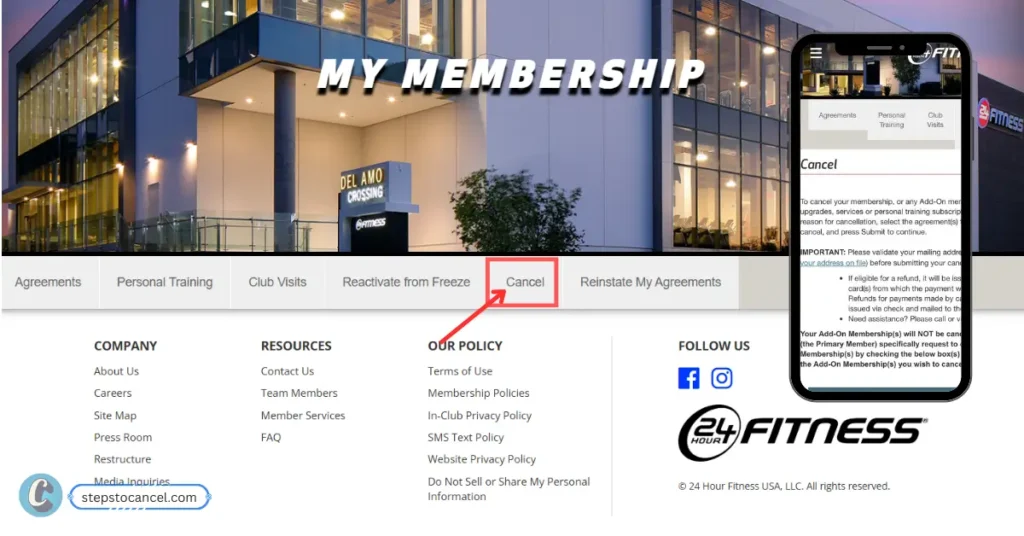
Members with a Monthly Payment membership can cancel from their online account:
- Log in to your account at 24hourfitness.com.
- Open the Cancel Membership page.
- The page offers 30% off your next 3 months’ dues if you stay. Choose No thanks (“I’d still like to cancel my membership”).
- Complete the cancellation in your account and save the confirmation.
The retention offer is only for Monthly Payment memberships. If you’d rather keep training at a lower price, choosing Yes keeps your membership active.
Have a limited-term or prepaid membership? The cancel page tells you to see a team member in club or contact 24 Hour Fitness through the Contact Us page, so use method 2 or 4 below.
2. Cancel Through the Contact Us Page
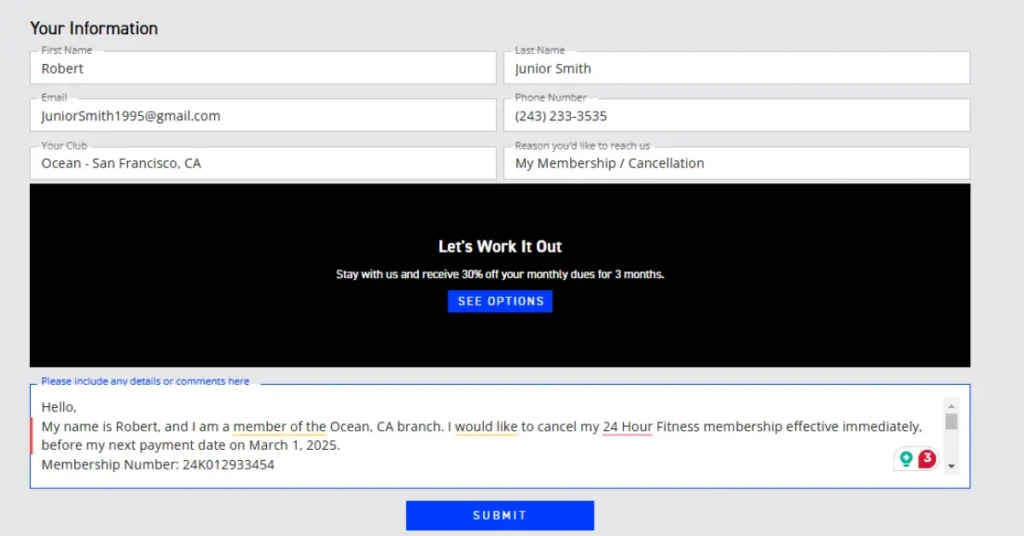
- Open the Contact Us page.
- Enter your name, email, phone number and home club.
- Pick the membership or cancellation topic and say clearly that you want to cancel. Include your membership agreement number or check-in code.
- Submit the form, then keep the reply that confirms the cancellation.
3. Cancel by Phone
- Call 24 Hour Fitness at (800) 432-6348 (the number on its Terms of Use and BBB profile) or call your home club.
- Say you want to cancel and give your name, home club and membership agreement number.
- Ask for a confirmation email or cancellation number before you hang up.
4. Cancel In Person at Your Local Gym
- Go to your home club and ask a team member at the front desk to cancel your membership.
- Bring photo ID and your membership agreement number or check-in code.
- Ask whether any fee or remaining commitment applies under your agreement.
- Get written or emailed confirmation of the cancellation before you leave.
24 Hour Fitness Cancellation Policy
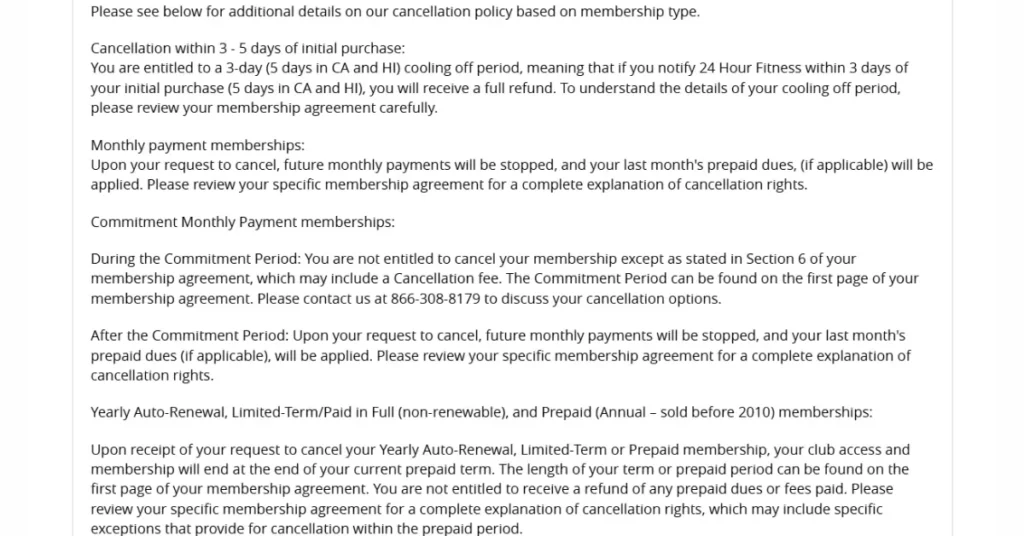
Right to Cancel After Signing
Many states give gym members a short right-to-cancel period after signing. The number of days depends on your state, so check the cancellation section of the agreement you signed rather than relying on one figure.
Monthly Membership Cancellation Rules
- Monthly Payment memberships: can be cancelled online from your account through the Cancel Membership page.
- Commitment memberships: early cancellation follows the terms in your agreement. If you freeze during the commitment period, the commitment is extended by the length of the freeze.
- Moving away: in a 2026 BBB reply, 24 Hour Fitness said a relocation request needs a new residence more than 25 miles from your Club of Enrollment and written evidence of the move.
- Annual Fee: the agreement can require a yearly Annual Fee, which is non-refundable.
Add-On Memberships and How They Work
- If other members (for example family add-ons) are billed to your payment method, name each one when you cancel and ask that every membership on the account is closed.
- If you pay another member’s dues and only want to stop paying, ask 24 Hour Fitness to remove your payment authorization or cancel that membership.
- Check your next statement. Report any charge you don’t recognize within 30 days, the window 24 Hour Fitness gave in a September 2026 BBB reply.
How to Freeze your 24 Hour Fitness Membership
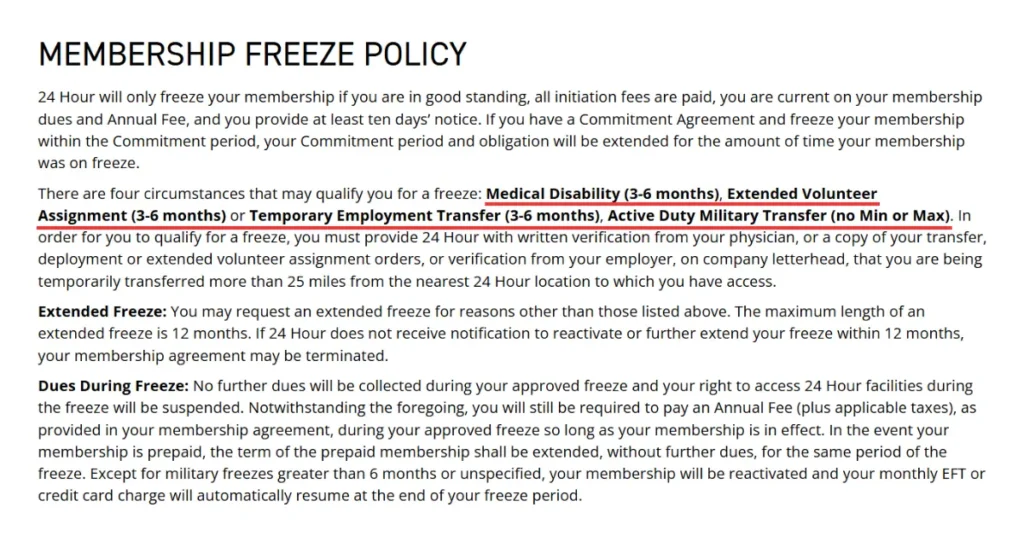
If your break is temporary, you can ask for a freeze instead of cancelling. 24 Hour Fitness’s Member Policies set these conditions:
- Make sure your account is in good standing: initiation fees paid and dues and Annual Fee up to date.
- Ask for the freeze at least 10 days ahead, at your club or through the Contact Us page.
- Send written proof: a physician’s note, transfer, deployment or volunteer-assignment orders, or an employer letter on company letterhead.
- Keep the confirmation that shows the freeze start and end dates.
Dues stop during an approved freeze and club access is suspended, but the Annual Fee (plus tax) is still charged while the membership is in effect. A prepaid membership is extended by the length of the freeze instead.
Who can Freeze or Hold Membership?
Four reasons qualify for a standard freeze. For transfers and volunteer assignments, the new location must be more than 25 miles from the nearest 24 Hour Fitness club you can use.
Qualifying reasons and lengths:
- Medical disability: 3–6 months, with written verification from your physician.
- Temporary employment transfer: 3–6 months, with a letter from your employer on company letterhead.
- Extended volunteer assignment: 3–6 months, with a copy of the assignment orders.
- Active-duty military transfer: no minimum or maximum, with a copy of your orders.
- Extended freeze for other reasons: you can ask for one; the maximum is 12 months.
How to Reactivate (Unfreeze) Your Membership?
Most freezes end on their own. To come back early, contact your club or use the Contact Us page. What happens at the end depends on the type of freeze:
- Standard freezes: the membership reactivates and your monthly EFT or card payment restarts automatically at the end of the freeze.
- Military freezes longer than 6 months or with no end date: these are the exception to automatic reactivation, so contact 24 Hour Fitness when you’re ready to return.
- Extended freezes: if 24 Hour Fitness doesn’t hear from you to reactivate or extend within 12 months, your membership agreement may be terminated.
24 Hour Fitness Cancellation FAQs
Will I get a refund if I cancel?
Is there a cancellation fee?
How to view or download my membership agreement?
First, Log in to My24 with your credentials.
Click on My Account to see the menu of options.
Then click on Agreements.
You will see agreements attached to your account.